Plan
See which plan is booked, what it includes and how many user seats are taken.
Under Plan you see which plan your business has booked, how many user seats are taken and what the next plan up adds. The page is open to all users.
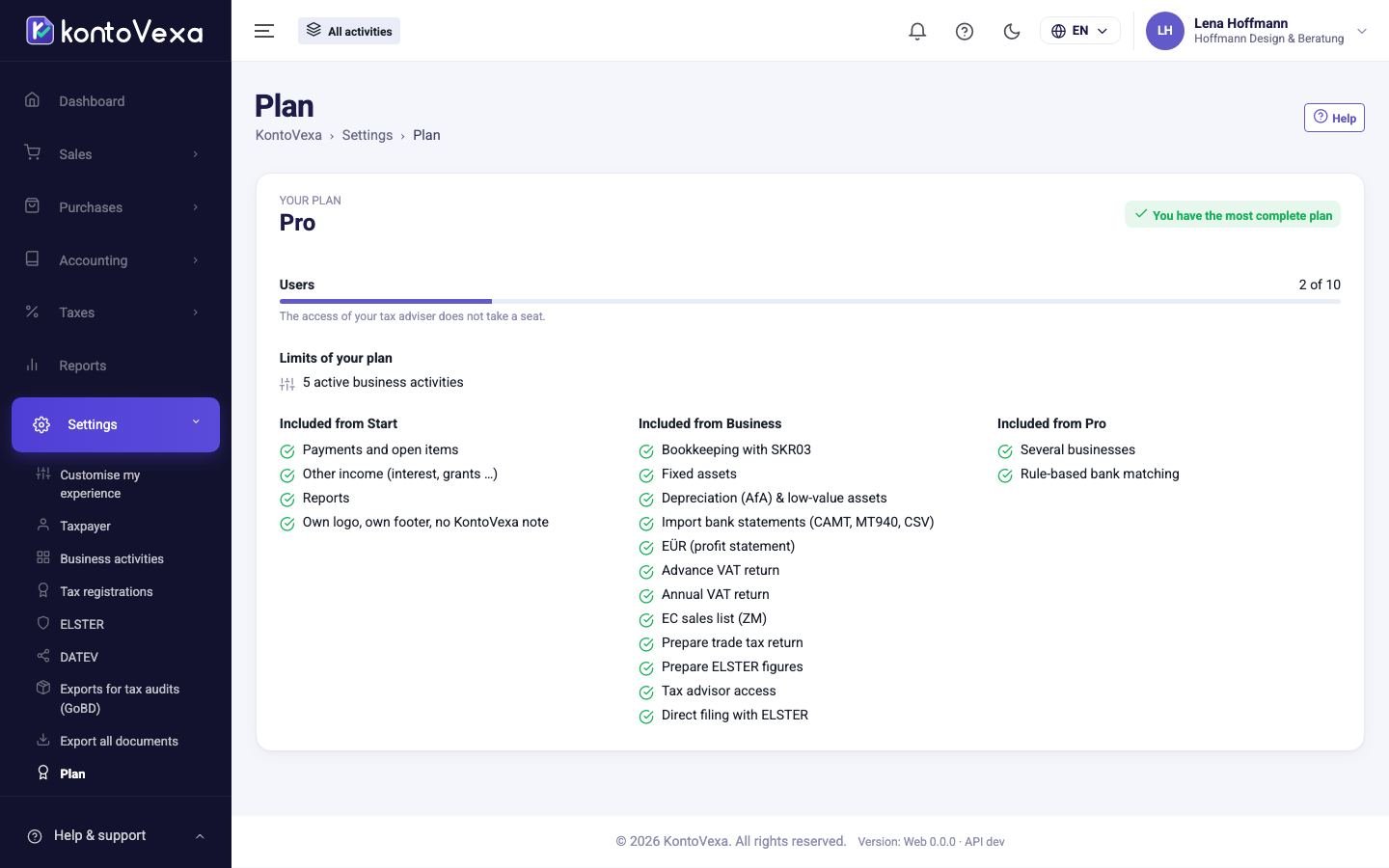
The plans at a glance
Each plan includes everything in the previous one.
| Plan | Users | Includes | |
|---|---|---|---|
| Free | 1 | Invoices and credit notes (PDF, ZUGFeRD, XRechnung), customers and products, received e-invoices, documents and up to 5 expenses per month – free of charge, with no time limit. | |
| Start | 1 | Invoices, customers and products, expenses and receipts, payments, e-invoices and reports for one business activity. | |
| Business | 3 | In addition: Bookkeeping with SKR03, Fixed assets / Depreciation (AfA) & low-value assets, Import bank statements (CAMT, MT940, CSV), Taxes: EÜR, VAT returns, annual VAT return, ZM, trade tax, Tax advisor access and Several businesses. | |
| Pro | 10 | Everything in Business, plus [[page:accounting-bank-rules | bank rules]] (automatic reconciliation rules) and more user seats. |
The list on the page itself is always the binding one: Your plan shows your plan, and below it which features are included from which plan.
User seats
The Users bar shows how many seats of your plan are taken. People who have been invited but have not yet accepted also take a seat. The access of your tax adviser does not take a seat.
When all seats are taken, you can only invite someone under Users once a seat becomes free or you change plan.
Change plan
- Click the button to upgrade to the next plan.
- You reach the customer portal where you manage your contract. Complete the change there.
As soon as the new plan applies, the additional features are available in KontoVexa. The Pro plan has no upgrade button; the page then shows You have the most complete plan.
KontoVexa Free: try for 30 days or choose a plan
On the Free plan the page shows two buttons: Try free for 30 days (no card) and Choose a plan. Both open the customer portal of Balmer Systeme in a new tab.
- Click Try free for 30 days (no card) to try a paid plan free of charge for 30 days, or Choose a plan to subscribe to a plan right away.
- Sign in to the customer portal with the same e-mail address as in KontoVexa and, if asked, complete the details of your business. The trial needs no payment details.
- As soon as the trial or the contract starts, the new plan applies in KontoVexa. The page then shows the plan and, below its name, until when it runs.
Only the owner of the account (role Owner) can start the trial or choose a plan; everyone else sees Only the owner of the account can start the trial or choose a plan. The link to the customer portal is valid for 15 minutes and only once: click again if needed.
If the trial ends without a subscription, your business goes back to Free automatically. All your data stays; only the features of the paid plans are locked again. On the paid plans (the trial included) owners and administrators need a second factor again when they sign in.
Hints about a bigger plan
On the Free plan KontoVexa points owners and administrators to a suitable plan in a few situations, each time with Try free for 30 days (no card) and Compare plans:
- when the 5 expenses of the month are recorded and you want to save a sixth one,
- when you sign in in January and February: your EÜR of the past year,
- once 10 invoices have been issued,
- when you want to set your own logo or footer for invoices.
Each hint appears at most once in 30 days. Simply close it if you do not need it.
Good to know
- If you open a screen that your plan does not include, KontoVexa redirects you to this page and names the feature and the plan that includes it at the top.
- Your data is not lost if you move to a smaller plan. Screens the plan does not include are simply no longer reachable.
- If, after a change of plan, your business has more users than seats, the users beyond the limit see the notice Your plan has no free user seat for you. Ask the owner to upgrade the plan or to free a seat.