 Black Deal 50% off the first year with annual billing – only until December 31, 2026.

QR Code on Invoices: Create and Use a GiroCode Correctly
A QR code on a German invoice is almost always a GiroCode, also called an EPC QR code. It contains your bank details, the amount and the payment reference in machine-readable form. Your customer scans it with their banking app, checks the pre-filled bank transfer and authorises it, without typing in an IBAN. For you, this means fewer transposed digits, faster incoming payments and payments that are matched correctly. Here you will learn what belongs in the code, how to get it onto your invoice, what to watch out for in terms of security and why it does not replace the mandatory invoice details or the E-Rechnung (e-invoice).
In brief
- In Germany, the QR code for payments is called a GiroCode. It follows the standard of the European Payments Council (EPC) and works with the banking apps of many Sparkassen (savings banks) and other banks.
- The Swiss QR-bill is a different procedure with its own payment part. Generators for the Swiss QR Code will not help you with German customers.
- The GiroCode is voluntary. The mandatory invoice details and the rules on the E-Rechnung apply regardless.
- The safest way is to create the code directly from your invoice data, so that the amount, IBAN and invoice number in the code and in the text always match.
- Ask your customers to check the details in the app before authorising the payment. This protects both sides against manipulated codes.
Table of contents
- GiroCode, Swiss QR or E-Rechnung: which code is meant
- What is inside a GiroCode
- How to get the GiroCode onto your invoice
- How your customer pays with a GiroCode
- Security: recognising manipulated codes
- What the QR code does not replace: mandatory details and the E-Rechnung
- Our view: the code is only as good as the data behind it
- Invoices and bookkeeping in one place
- Frequently asked questions
- Sources
GiroCode, Swiss QR or E-Rechnung: which code is meant
Anyone searching for “QR code invoice” quickly ends up on Swiss websites. That is because Switzerland introduced the QR-bill nationwide: there, it replaces the former variety of payment slips, as the financial infrastructure operator SIX describes in its implementation guide. Germany has no such mandatory payment slip. Here, the GiroCode is customary, which is based on the uniform Europe-wide SEPA rules. These SEPA procedures are based on the EPC rulebooks, as the Deutsche Bundesbank emphasises.
The E-Rechnung, in turn, is not a QR code but a structured data format for the entire invoice. The three terms are often mixed up, so here is an overview:
| Feature | GiroCode (EPC QR code) | Swiss QR-bill | E-Rechnung (XRechnung, ZUGFeRD) |
|---|---|---|---|
| Where it is common | Germany and other SEPA countries | Switzerland and Liechtenstein | Germany, mandatory in B2B transactions |
| What it contains | Payment data for a SEPA bank transfer | Payment data in the Swiss QR Code with its own payment part | All invoice data as a structured file |
| Who reads it | Customer with a banking app | Customer with a Swiss banking app or scanner | The recipient's bookkeeping and ERP software |
| Mandatory? | No, a voluntary service | The standard for payments in Switzerland | Yes, depending on turnover and transition period |
| Replaces mandatory details? | No | No | No, but contains them in structured form |
So for you as a self-employed person or small business in Germany, the GiroCode is the right choice. If you have customers in Switzerland, the SIX requirements apply there. In that case, check with your bank which payment method your Swiss customers can use.
What is inside a GiroCode
At its core, a GiroCode is a small data record that is translated into a QR pattern. According to the technical description of the format, it contains the recipient name, IBAN, amount, currency and purpose. In addition, there is either a structured creditor reference or a free-text payment reference, not both. In version 002 of the standard, the BIC is optional for payments within the EEA.
In practice, it looks like this:
- Recipient name: your name or company name, exactly as registered with the account.
- IBAN: the account the payment should go to. A single wrong character makes the code unusable or misdirects money.
- BIC: not required for domestic and EEA payments in the current version.
- Amount and currency: the gross amount of the invoice in euros.
- Payment reference or creditor reference: for small businesses usually the invoice number, ideally supplemented by the customer number.
Our tip for the payment reference: put the invoice number at the beginning. If the customer shortens or adds to the text in the app, the number is preserved, and you can immediately match the incoming payment on your bank statement to the right invoice.
How to get the GiroCode onto your invoice
You essentially have two options. The Sparkassen describe that GiroCodes can be created using a generator for office programs or added to invoices automatically via an interface. Which option suits you depends on how many invoices you write.
Option 1: Generate each code individually
This is the option for a few invoices a month, for example during the start-up phase.
- Finish the invoice, including the final amount and invoice number.
- Open a GiroCode generator and enter the name, IBAN, amount and payment reference.
- Check every detail against the invoice, especially the IBAN and the amount.
- Download the code as an image, preferably as a PNG or vector graphic.
- Insert it into the invoice and export the invoice as a PDF.
- Test the code with your own banking app before sending. Then simply cancel the transfer.
The catch: every copy step is a source of errors. If you change an item afterwards, you have to remember to generate a new code as well. Otherwise your customer pays the old amount.
Option 2: Generate the code automatically from the invoice data
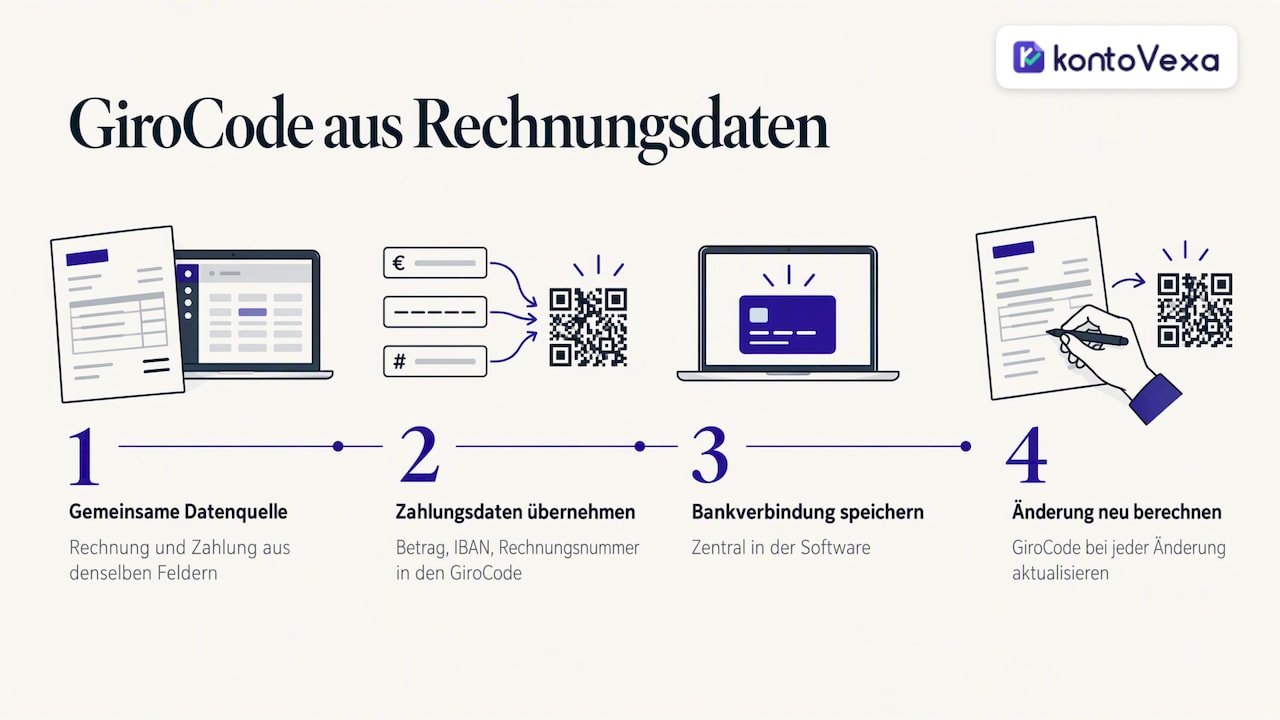
If you write invoices regularly, a solution in which invoice data and payment data come from a single source is worthwhile. Invoicing software or an interface to the bank format then generates the code from the same fields that appear in the invoice text. That way, the amount, IBAN and invoice number cannot drift apart. When choosing software, make sure it stores your bank details centrally and recalculates the code with every change.
Placement and design
A GiroCode only works if it is found and read. These points have proven effective:
- Position: near the final amount or the payment terms, not in the footer between the commercial register details and the bank details.
- Label: a short note such as “Pay easily: scan the code with your banking app” explains to customers what the code does.
- White space: leave a clear margin around the code so the camera can recognise it cleanly.
- Contrast: black on white, no colour gradients, no logo in the middle.
- Size: large enough to scan reliably both on a printed A4 sheet and on screen. Test both.
- Bank details in the text as well: anyone without a suitable app still needs the IBAN and payment reference legible on the invoice.
How your customer pays with a GiroCode
For the recipient, the process is simple. Sparkasse Hanau describes it like this: the customer scans the code with the banking app, the data lands in the transfer form, they check it and authorise the transfer with a TAN. The prerequisites are a smartphone, online or mobile banking access with chipTAN or pushTAN, and the appropriate app.
Step by step:
- Open the banking app and select the function for scanning invoices or QR codes.
- Point the camera at the GiroCode, on paper or on screen.
- Check the pre-filled transfer: recipient, IBAN, amount, payment reference.
- Authorise with a TAN.
This works on a PC screen just as well as on paper. Many customers open the PDF invoice on their laptop and scan the code with their phone. This also answers a common question: scanning the code on the display of the very phone you want to pay with is awkward. It is better to open the invoice on a second device. Some apps can also read codes from a saved image or PDF. Your bank will tell you whether your app can do this.
VR Bank Rhein-Neckar sums up the advantage for both sides: a fast transfer and error-free, complete transfer of the invoice data. On the customer's side, all that is needed is a smartphone and a banking app with a QR code reader.
Security: recognising manipulated codes
A GiroCode is purely a data format. It does not check whether the IBAN really belongs to you. The risk: someone intercepts or forges an invoice and swaps the code for one with a different IBAN. Protection therefore comes from checking the payment data in the banking app before the customer authorises the payment.
What you can do as the invoice issuer:
- Keep the IBAN identical in the text and in the code. That way, every customer can compare them at a glance.
- Send invoices through a fixed channel, for example always from the same sender address or via a customer portal. Announce any change of account in good time and through a second channel.
- Do not use codes from third-party sources. Generate the code yourself from your stored bank details.
- Do a test scan before sending. It shows you whether the recipient name and IBAN are correct.
- Do not edit PDFs afterwards. Change the invoice at the source and export it again.
What you can tell your customers: if the recipient name in the app does not match your company or the IBAN differs from the one on the invoice, they should not pay and should call you on a known phone number. Anyone who believes they have already paid a forged invoice should contact their own bank immediately so that it can check whether the payment can still be recalled.
What the QR code does not replace: mandatory details and the E-Rechnung
The GiroCode is a payment service. It does not change anything about the legal requirements for your invoice.
Mandatory details remain mandatory. Under § 14 UStG, the name and address of both parties, the Steuernummer (tax number) or USt-IdNr. (intra-EU VAT identification number), the invoice date and sequential invoice number, the service, the date of supply, the consideration and the tax rate must appear on the invoice, with or without a code. Which details are required in each case and what applies to Kleinunternehmer (small businesses under the small-business VAT scheme) is explained in our guide to the mandatory invoice details. If you write invoices for international customers, our guide to invoices in English will help you.
The E-Rechnung is coming to the B2B sector anyway. Between domestic businesses, the structured E-Rechnung is gradually becoming mandatory. A PDF invoice with a GiroCode is not an E-Rechnung within the meaning of the law, even if it is sent electronically. Our overview of the E-Rechnung obligation shows you when the obligation applies to you, and with the E-Rechnung obligation calculator you can check it in just a few clicks.
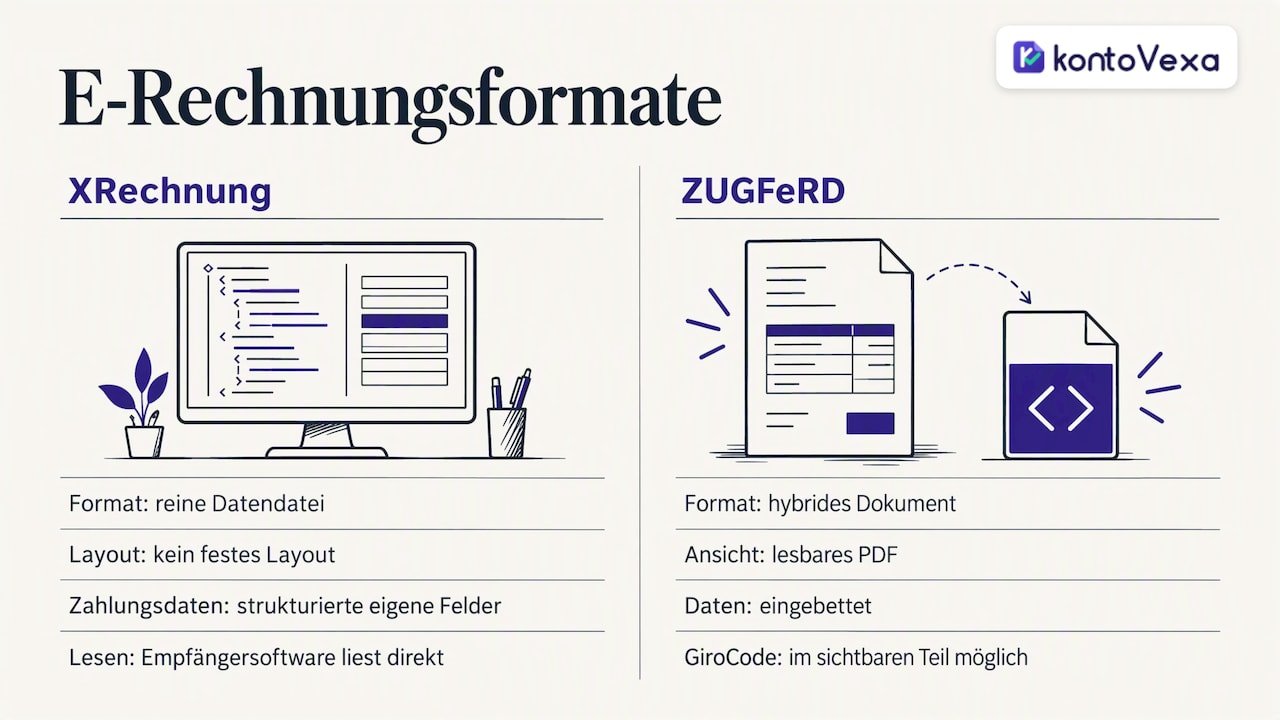
How do the GiroCode and the E-Rechnung fit together? An XRechnung (German e-invoice format) is a pure data file without a fixed layout. The payment data is stored there in a structured way in separate fields, and the recipient's software reads it directly. A ZUGFeRD document, by contrast, is a hybrid format: a readable PDF with embedded data. A GiroCode can appear on the visible part, where it then serves as an aid for customers who pay manually via an app. We explain the differences between the formats in detail in our article on XRechnung, ZUGFeRD and Peppol.
Our view: the code is only as good as the data behind it
We see the same pattern among self-employed people again and again: the invoice is created in one program, the QR code in another, and the bank details are in a third note. Every step in between is a point where an amount becomes outdated or a digit slips.
That is why we do not think much of maintaining payment data separately from bookkeeping. The invoice, customer, payment term, incoming payment and Umsatzsteuer (VAT) belong in one place. Then the amount on the invoice matches the one in the advance VAT return, and open items stand out before a payment reminder becomes necessary.
We built Kontovexa for exactly this purpose: invoices, E-Rechnungen in ZUGFeRD and XRechnung format, expenses, receipts, EÜR (cash-basis income/expense statement) and VAT in one interface that adapts to your business and can be used in your preferred language. Submission to the Finanzamt (local tax office) runs directly via ELSTER (official e-filing portal). A QR code on the invoice is a nice convenience. Clean data from the invoice all the way to the tax return is what ultimately saves you time and stress.
Paulo
Invoices and bookkeeping in one place
If you no longer want to assemble your invoices in text documents but create them from a single data source, try Kontovexa. With our invoicing software for the self-employed, you write invoices and E-Rechnungen, manage customers and suppliers, and archive receipts in a legally compliant way. Deadline reminders help you with your advance VAT return and annual return.
You can test Kontovexa free of charge for 30 days, without a credit card. After that, you choose a plan: Start for €99 a year or €9.90 a month, Business for €199 a year or €22.90 a month, Pro for €299 a year or €32.90 a month. You can find all plans compared on our pricing overview.
Frequently asked questions
Is a QR code on the invoice mandatory in Germany?
No. The GiroCode is a voluntary service for your customers. What is mandatory are the invoice details under § 14 UStG and, increasingly in the B2B sector, the structured E-Rechnung, not the payment code.
Can I use a Swiss QR-bill generator for German customers?
That does not make sense. The Swiss QR-bill follows the SIX standard and is designed for payments in Switzerland and Liechtenstein. For SEPA transfers by German customers, the GiroCode according to the EPC standard is the right code.
Does the GiroCode work with every banking app?
Many apps from Sparkassen and banks in Germany read GiroCodes; the name of the function varies from bank to bank. Your bank can tell you whether your app supports it. That is why the IBAN and payment reference should always appear in plain text on the invoice as well.
Does the BIC have to be in the GiroCode?
In the current version 002 of the standard, the BIC is optional for payments within the EEA. Banking apps identify the bank from the IBAN. What matters is that the IBAN, name and amount are correct.
What should I do if the invoice amount changes after sending?
Create a corrected invoice with a new code or an invoice correction according to the usual rules. Never send just a new QR code, because the invoice text and payment data must match. Clearly tell the customer which document applies.
Sources
- SIX: Implementation guide for the QR-bill
- Deutsche Bundesbank: Payments and securities settlement
- GiroCode: data fields of the format
- Sparkasse.de: Creating a GiroCode
- Sparkasse Hanau: GiroCode, paying with a code
- VR Bank Rhein-Neckar: Invoice with QR code
- Wikipedia: EPC QR code
Recommendations
This article was machine-translated from German. Only the German version is authoritative.